How to design a custom granule blend with the rubber visualizer
Quick answer
The free rubber visualizer lets you blend up to 8 solid EPDM colors, preview the mix on a 3D sample slab and see the pounds of each color in a 55 lb batch. Shares are by weight and must total 100%. Save the spec sheet as a PDF for your installer, then confirm the blend against a physical sample, because screens do not show granule color accurately.
Key takeaways
- A blend can use up to 8 colors; most installed blends use two to four.
- Shares are percentages by weight of one 55 lb batch, and they must reach 100% before you can save.
- Try accent colors at 10 to 15% first; small shares of a bright color still show clearly.
- The PDF spec sheet lists each color, its share, pounds per batch and color code.
- Always check a physical sample in daylight on site before ordering.
Open the rubber visualizer, pick up to eight colors, set each one’s share until the total reaches 100%, and save the spec sheet. The tool shows the mix on a 3D sample slab and works out the pounds of each color in a 55 lb batch. Then request a physical sample, because no screen shows granule color exactly.
Before you start: check the published blends
Twelve pre-mixed blends already exist, each with a published recipe by color code and percentage. See the color options page. One may be close to what you want, and a published blend is easy to reorder to match later. If none is right, build your own.
Reading a published recipe
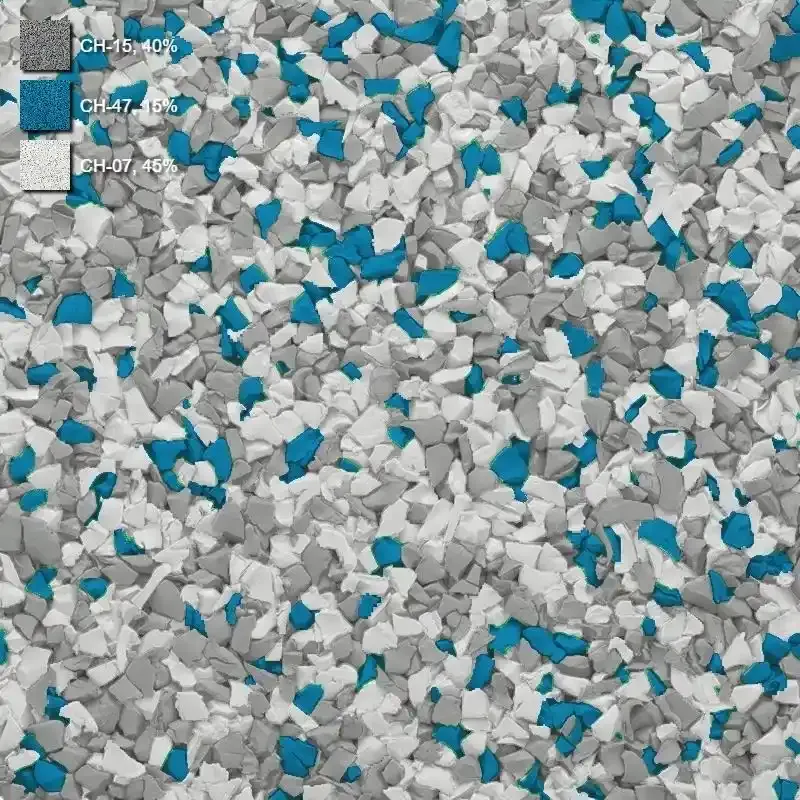
Every published blend lists its recipe as color codes and percentages. The Ash blend, for example, is CH-07 at 10%, CH-57 at 20%, CH-43 at 30% and CH-15 at 40%. In a 55 lb batch that is 5.5 lb, 11.0 lb, 16.5 lb and 22.0 lb, which adds up to 55.0 lb. Use the same arithmetic on any recipe, or enter the colors in the visualizer and let it do the sum.
Step 1: pick your colors
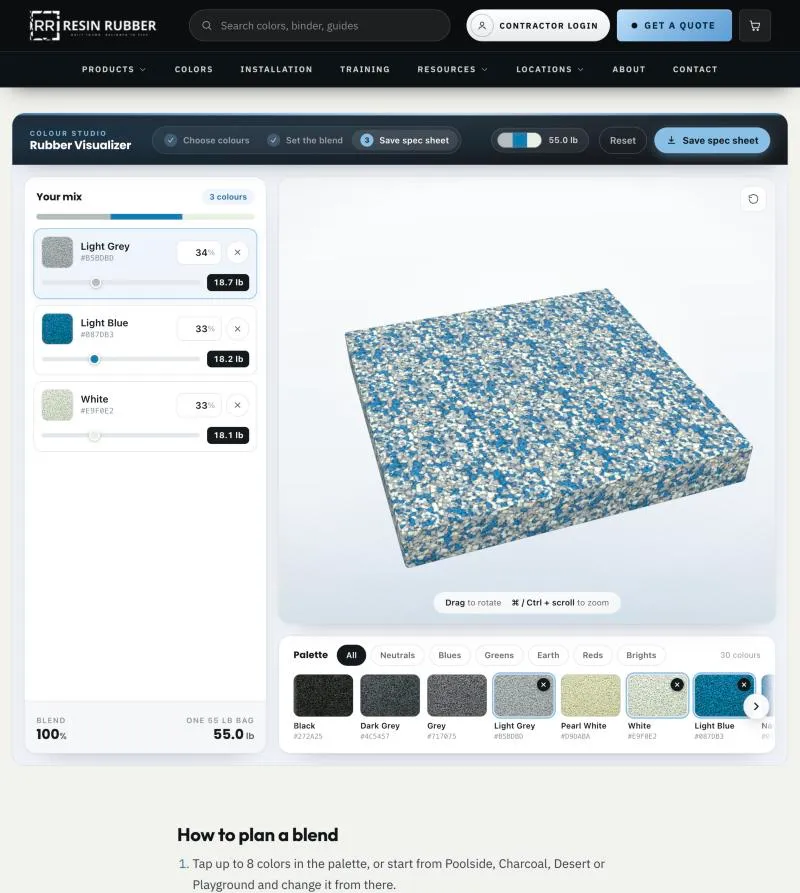
Tap up to 8 colors in the palette, or start from one of the preset blends (Poolside, Charcoal, Desert or Playground) and change it. Most installed blends use two to four colors, and all twelve published blends sit in that range. More colors do not make a better blend. They make a busier one.
Step 2: set the shares
Drag a slider or type an exact percentage. The total has to reach 100% before you can save. If you are a little short, the Balance to 100% button closes the gap.
Shares are by weight. For example, the Poolside preset is 34% Light Grey, 33% Light Blue and 33% White, which in a 55 lb batch works out to 18.7 lb, 18.2 lb and 18.1 lb. The tool rounds to the nearest tenth of a pound and adjusts the last tenth so the column always adds up to 55.0 lb.
Step 3: look at the slab properly
Turn the 3D slab and view it from a low angle as well as from above. A bright accent shows up clearly even at a small share, so start accents at 10 to 15% and adjust from there. Blends that look balanced from above can look different from the angle people actually see the surface at.
Step 4: save the spec sheet
Once the blend adds up to 100%, press Save spec sheet. The one-page PDF lists each color, its share, the pounds for one 55 lb batch and the color code. Send it to your installer or client so that whoever mixes or orders knows exactly what you chose.
Step 5: check a physical sample
Screens and printed charts cannot show granule color accurately. Request a sample of the blend or of the solid colors in it, and look at it on site, in daylight, next to the paving, planting and building. If the surface will be in strong sun, check it in afternoon light. See also solid or mixed color EPDM granules.
From spec sheet to order
On smaller jobs, installers mix solid-color bags on site to the shares on the spec sheet. Multiply the pound weights by the number of batches the job needs. The thickness and area decide the number of batches, and the materials team can confirm quantities. Custom ratios are possible on larger commercial and municipal jobs, so contact the team about lead times and minimum quantities.
Order the full quantity for the job at once. If you need a repair or extension later, the same blend helps the new work match. See repairing and extending a rubber surface.
Next step
Open the rubber visualizer, build a blend and save the spec sheet. Then ask for a sample.
Frequently asked questions
How accurate are the colors on screen?
Close, but not exact. Every screen shows color a little differently, and daylight on site changes how granules look. Use the visualizer to narrow a blend down, then check a physical sample before you order.
How are the pound weights worked out?
Each share is a percentage by weight of one 55 lb batch, the same size as a bag of Resin Rubber granules. Weights are rounded to the nearest tenth of a pound and always add up to 55.0 lb. Multiply them by the number of batches on the job.
Can I order a custom blend?
Custom ratios are possible on larger commercial and municipal jobs. Contact the team about lead times and minimum quantities. On smaller jobs, installers mix solid-color bags on site to the shares on your spec sheet.
Is there a published blend that might already suit me?
Possibly. There are twelve published blends on the color options page, with recipes by color code and percentage.